AI has made it easier to produce a complete video, but it has not removed the need to inspect the work. For long-form YouTube, that inspection layer is where many faceless channels either become real media businesses or turn into a pile of almost-finished exports.
The problem is simple: a 20-minute, 45-minute, or 2-hour video has too many failure points to trust a single prompt-to-publish workflow. A script can repeat itself. A voice can drift in tone. A visual can show the wrong century, wrong object, wrong person, or wrong mood. A render can look fine in a preview and still ship with broken audio, low-resolution scenes, or an awkward transition every few minutes.
A review queue gives the creator a way to catch those problems before the audience, advertisers, or YouTube reviewers do.
Why Long-Form AI Videos Need a Review Queue
Short videos can hide rough edges. Long-form videos cannot. The longer the runtime, the more obvious every repeated phrase, mismatched scene, thin source, weak transition, and low-effort pattern becomes.
This matters more in 2026 because the market is separating fast AI output from useful AI-assisted production. Recent creator case studies show that successful AI video channels still spend serious time on scripting, revision, visual consistency, voice quality, and post-production. At the same time, YouTube’s monetization guidance continues to put pressure on originality, non-repetition, rights, and disclosure for realistic AI-generated or altered content.
That does not mean AI videos are automatically unsafe. It means creators need a process that proves the video is more than a mass-produced template.
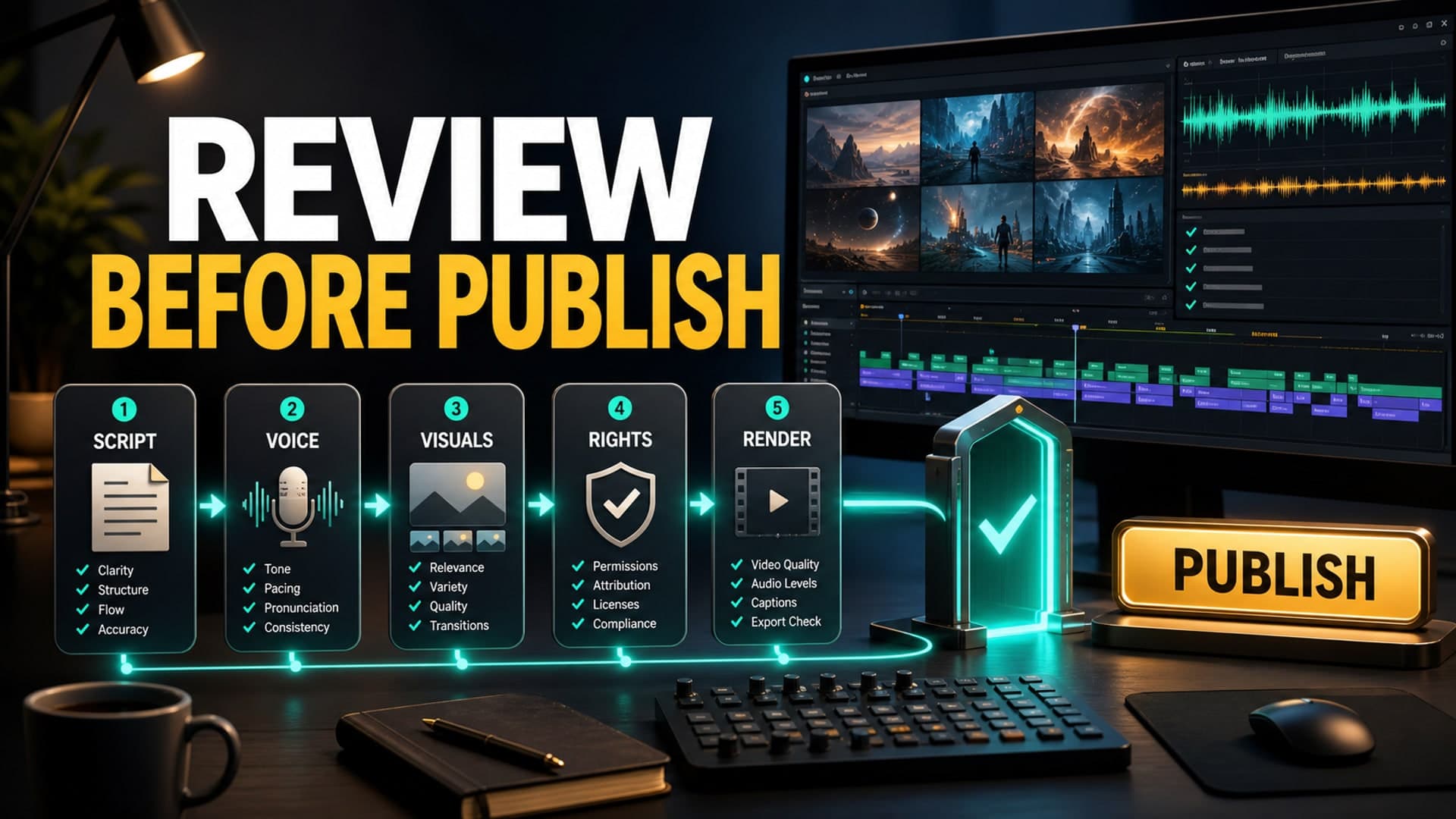
A review queue is not just a checklist. It is a staged system where each video moves through specific gates before publishing. Each gate answers one question: is this video ready to move forward, or does it need revision?
Start With the Script Review
The first gate is the script, because every later production decision depends on it.
A good long-form AI script review should check for four things: factual care, structure, originality, and watchability. If the script is weak, the voiceover and visuals will only make the weakness more expensive.
Look for repeated explanations, generic introductions, unsupported claims, and sections that do not advance the promise of the video. In faceless documentary, explainer, story, and sleep-adjacent niches, the script should have a clear internal rhythm. It needs enough structure to keep viewers oriented without sounding like a list of generated paragraphs.
For practical review, mark the script in three passes:
- Cut: remove repetition, filler, and claims you cannot support.
- Clarify: improve confusing transitions, vague sections, and weak examples.
- Produce: flag the moments that need specific visuals, sound cues, or slower narration.
The goal is not to make the script sound less like AI in a cosmetic way. The goal is to make it more useful, more specific, and easier to produce.
Review the Voice Before Visuals
Many creators jump from script to visuals too quickly. For long-form videos, voiceover should usually be reviewed before the full visual pass.
The voice carries the video. If the narration is too fast, too flat, too dramatic, or inconsistent across sections, the visuals will not fix it. This is especially important for faceless channels where the voice becomes the channel’s most recognizable asset.
Check pacing first. A documentary voice can carry more energy than a sleep history voice. A technical explainer needs clarity over mood. A story channel needs emotional variation without becoming theatrical. The right voice depends on the format.
Then check pronunciation, pauses, and section endings. Long-form narration should give the viewer room to process. If every sentence has the same cadence, the video will feel machine-made even when the content is original.
The best review habit is to listen without watching anything. If the voiceover cannot hold attention on its own for a few minutes, the video is not ready for visual production.
Build a Visual Continuity Pass
AI visuals create a specific review problem: they can look impressive one scene at a time while failing as a sequence.
A visual continuity pass checks whether the video feels like one coherent piece rather than a slideshow of unrelated generations. For documentary-style videos, this means checking time period, geography, character consistency, object accuracy, and visual mood. For explainers, it means checking whether the images actually support the point being made. For AI story channels, it means making sure recurring characters, locations, and emotional beats remain stable.
Review visuals in timeline order, not as isolated assets. Ask:
- Does this image or clip match the narration at this exact moment?
- Does the style stay consistent enough for the viewer to trust the video?
- Are any visuals misleading, uncanny, or unintentionally funny?
- Are there repeated compositions that make the episode feel templated?
- Are realistic AI scenes disclosed when required?
This pass is where many “almost good” AI videos become publishable. It is also where creators avoid the reputation damage that comes from shipping obviously mismatched scenes.
Add a Rights and Policy Gate
Before rendering, every long-form video should pass a rights and policy gate.
This is not legal theater. It is basic channel protection. You need to know where the music came from, whether stock footage is licensed, whether AI voices and visuals are commercially usable, whether public-domain material is actually public domain for your use case, and whether any realistic AI-generated scenes require disclosure in YouTube Studio.
YouTube’s public guidance is clear that monetizable content should be original and non-repetitious, and that creators must disclose realistic AI-generated or meaningfully altered content. The safest workflow is to record those decisions before upload, not after a monetization review or audience complaint.
A simple rights log can include:
- Script source notes and research links.
- Voice provider and license terms.
- Music and sound source.
- Stock footage source and license.
- AI visual model or provider.
- Disclosure decision for realistic synthetic scenes.
- Any sensitive topic review notes.
This may feel slow at first. It becomes faster when it is part of the normal production queue.
Do a Render Review on the Final File
The last review should happen on the exported video file, not only inside the editor.
Long-form exports can fail in quiet ways. Audio can desync. A section can render at the wrong resolution. Music can become too loud after compression. A subtitle track can drift. A thumbnail can promise a video that the first five minutes do not deliver.
Watch the final file in chunks if the video is long, but do not skip the opening, section transitions, and ending. Those are the points where production mistakes are most visible.
A practical render review should check:
- Audio levels between narration, music, and ambience.
- Visual resolution and frame consistency.
- Broken or repeated scenes.
- Abrupt transitions.
- Caption or subtitle sync.
- Chapter timing, if used.
- Thumbnail and title alignment with the actual video.
The final question is simple: would a viewer feel this was intentionally made, or merely assembled?
FAQ
Can AI-generated YouTube videos be monetized?
Yes, AI-generated videos can be monetized when they follow YouTube’s monetization policies. The content still needs originality, rights clearance, and enough creative value to avoid feeling repetitive or mass-produced.
Does YouTube penalize AI voiceover?
YouTube does not automatically penalize a video just because it uses AI voiceover. The bigger issue is whether the overall channel feels original, useful, and policy-compliant rather than reused, repetitive, or misleading.
Should I disclose AI-generated visuals on YouTube?
You should disclose AI-generated or meaningfully altered content when it appears realistic and could make viewers think something real happened. Non-realistic or minor production assistance may not require the same disclosure, but creators should review YouTube’s current upload guidance.
How long should a faceless AI video be?
The right length depends on the niche, promise, and production quality. Many long-form faceless formats work best when the runtime is long enough to deliver depth, but not so long that the script, voice, or visuals become padded.
What is the biggest mistake in AI video automation?
The biggest mistake is treating automation as a replacement for editorial judgment. AI can speed up production, but long-form channels still need review gates for script quality, voice, visuals, rights, and final rendering.
How AutoTube.pro Fits Into This Workflow
A review queue is easier to maintain when the production pipeline is not scattered across six different tools. That is where AutoTube.pro fits naturally for long-form faceless creators.
AutoTube.pro is built around the full long-form workflow: ideation, script generation, AI voiceover, media generation, stock footage, rendering, thumbnail creation, and a Canvas-style thumbnail editor. Instead of moving a video from one disconnected app to another, creators can keep more of the production process in one place and review each stage with less context switching.
That matters because review work depends on visibility. If the script, voiceover, visuals, render, and thumbnail all live in separate systems, quality control becomes fragile. Notes get lost. Versions drift. A fix in one tool creates a new problem in another.
For beginner and intermediate faceless creators, the goal should not be “publish without touching anything.” The better goal is to build a repeatable production system where AI handles the heavy lifting and the creator keeps enough control to protect quality, originality, and monetization potential.
If you are building long-form faceless videos and want a cleaner way to move from idea to finished upload, AutoTube.pro is designed for that kind of workflow.